 PCBPro
Playing guitar through it#
Pedal and amp boards can be played: your own guitar through the circuit in real time, a guitar clip rendered through it, or its frequency response as you turn the knobs. All of it is the board as you designed it, simulated part by part, with a speaker cabinet after it if you like.
Play live#
Simulate › Play live (guitar in)… (Ctrl+Shift+L), or Play live… in the Simulation panel. Plug your guitar into an audio interface, and the circuit runs between its input and your speakers or headphones, with about 10 ms of latency.
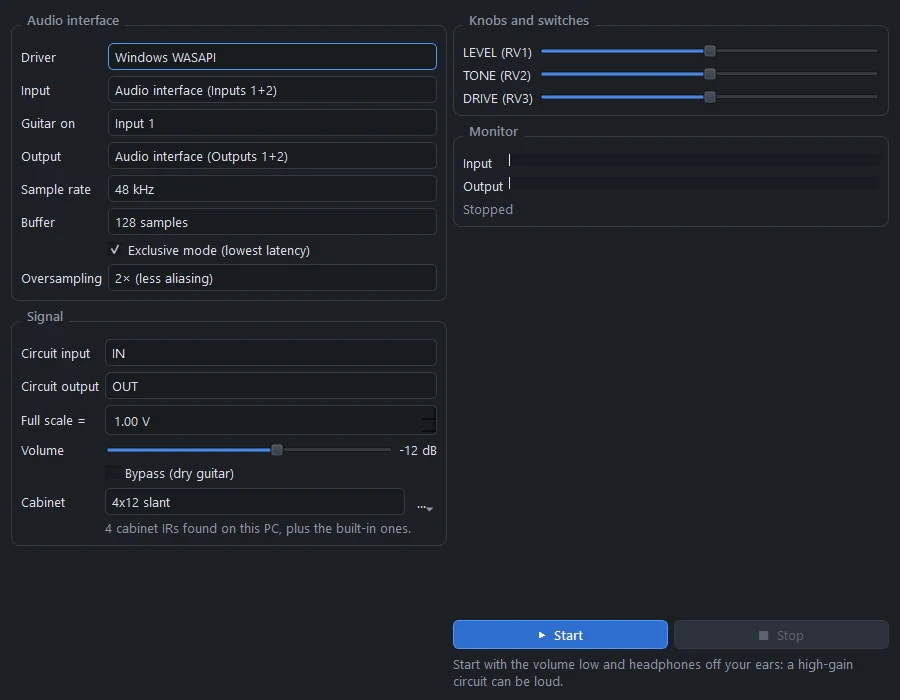
Audio interface#
| Setting | |
|---|---|
| Driver | WASAPI, ASIO, DirectSound or MME on Windows (Core Audio on macOS, ALSA or JACK on Linux). WASAPI is picked first. |
| Input, Guitar on | The interface and the channel your guitar is plugged into |
| Output | Where the sound goes. It plays on every output channel. |
| Sample rate | 44.1, 48, 88.2 or 96 kHz |
| Buffer | 32 to 512 samples. Smaller is lower latency; raise it if you hear crackles. |
| Exclusive mode | WASAPI exclusive mode, for the lowest latency |
| Oversampling | Off, 2× (less aliasing) or 4× |
Signal#
| Setting | |
|---|---|
| Circuit input, Circuit output | The nets the guitar goes into and the sound comes from (IN and OUT on pedals, the speaker on amps) |
| Full scale = | How many volts a full-scale input means. "1.00 V" means a 1 V guitar signal hits the interface's full scale. Set it so your interface's input gain gives a realistic guitar level. |
| Volume | The output level, -48 to +12 dB |
| Bypass | The dry guitar, for comparison |
| Cabinet | A speaker cabinet IR after the circuit (see Speaker cabinets) |
The pedal's or amp's own knobs are on the right: turn them while you play. The meters show the input and output levels.
Start with the volume low and headphones off your ears: a high-gain circuit can be loud.
How it works#
The board is compiled into a nodal DK state-space model, the component-modelling approach amp-sim plugins use. Every linear part (resistors, pots at their current setting, capacitors and inductors) is folded into constant matrices once; each sample, only the diodes, transistors, op-amps and tubes are solved, with a small Newton iteration, in a kernel compiled with numba. Oversampling runs the circuit at 2× or 4× the audio rate with anti-alias filters. The audio runs in its own process, so the window never interrupts it, and the chain is: input channel → volts → circuit → DC blocker → cabinet → volume → a soft safety limiter → output.
What it costs#
Pedals run comfortably on one CPU core. On an amp board, the output is the speaker, and full scale is twice the speaker voltage at rated power; a Plexi or EL84 amp needs roughly 20-60 % of one core at 2× oversampling. Before starting, PCBPro measures the cost and lowers the oversampling if needed. The largest high-gain designs (5 or 6 preamp tubes and four power tubes) can be too heavy to play live: Play live then says so, and Audio play-through still renders them.
Audio play-through#
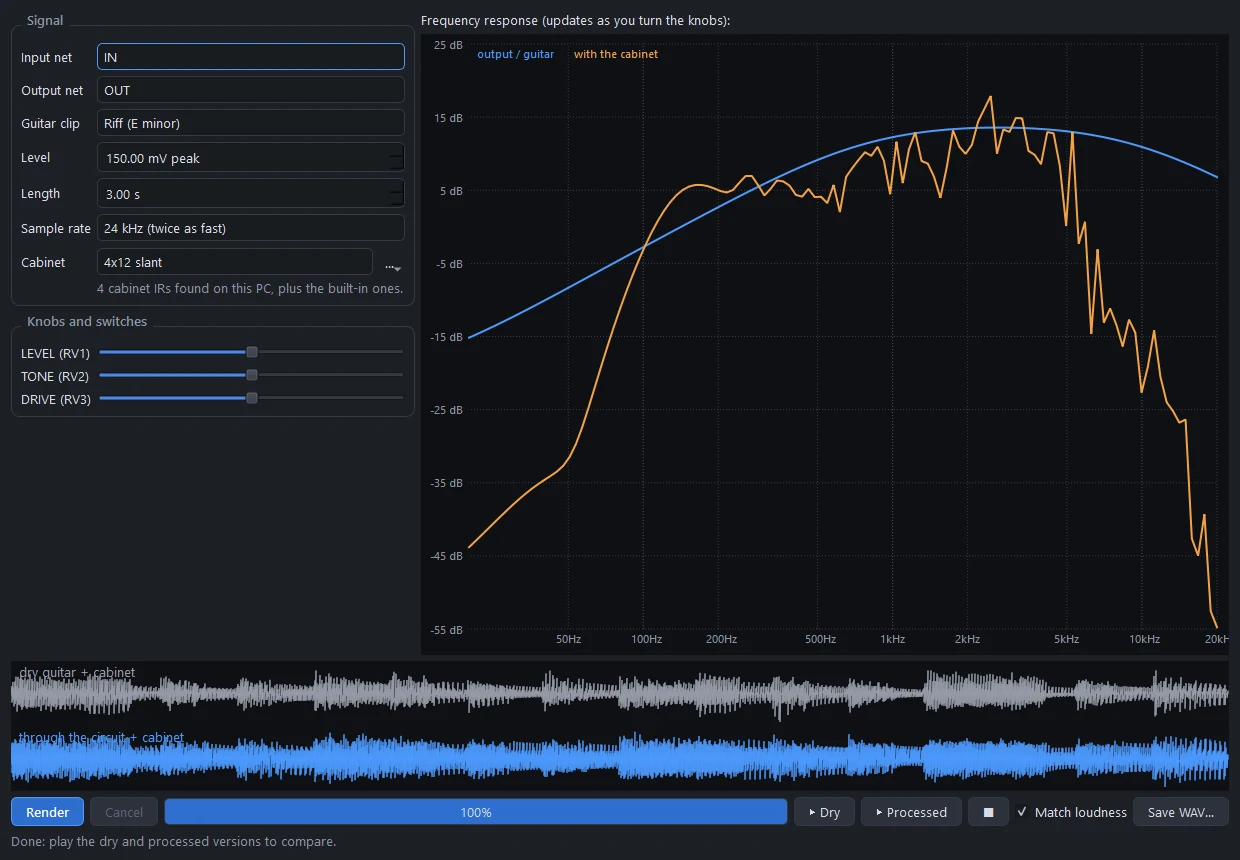
Simulate › Audio play-through…, or Play through… in the Simulation panel, renders a guitar clip through the circuit, so you can compare the dry and processed sound and save it.
| Setting | |
|---|---|
| Input net, Output net | Where the guitar goes in and the sound comes out |
| Guitar clip | Riff (E minor), Metal riff (palm mutes), Open chords, Single notes, Power chords, a 440 Hz sine, or your own WAV file |
| Level | The guitar's peak level (150 mV is a typical single coil) |
| Length | 0.5 to 10 seconds |
| Sample rate | 48 kHz, or 24 kHz to render twice as fast |
| Cabinet | Off, or a cabinet IR |
| Knobs and switches | Every pot and switch on the board |
Render, then ▶ Dry and ▶ Processed. Match loudness plays both at the same level, so you hear the tone and not just the volume. Save WAV… keeps the result. The waveforms of both are drawn under the plot.
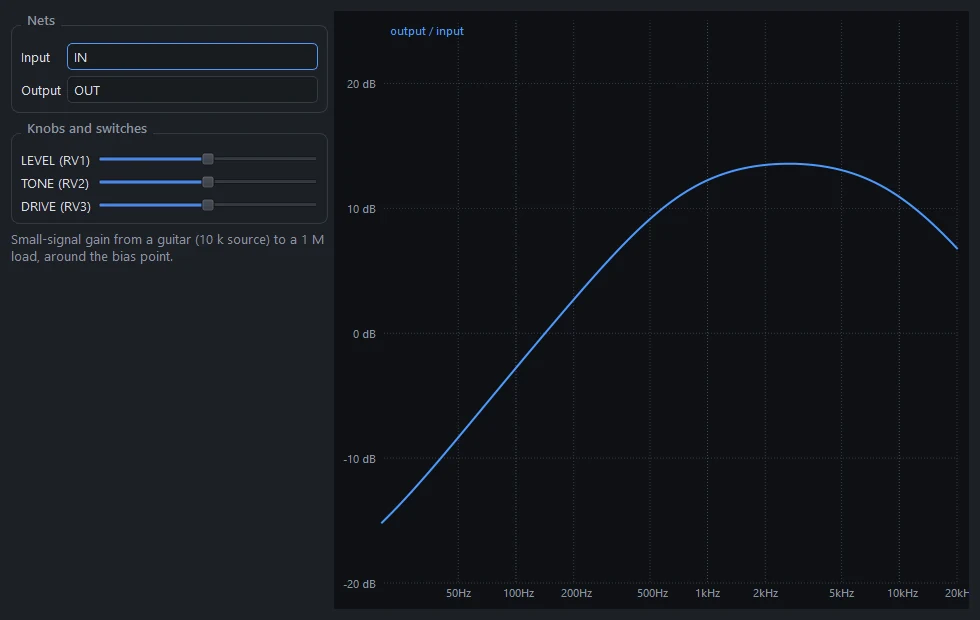
The guitar is a voltage source with a pickup-like 10 kΩ source impedance, and the output is loaded with 1 MΩ, like an amp input. The clips are synthesised the way a string and pickup make the sound (each string's modes, pluck and pickup positions, palm muting, the pickup's resonance), so they have the spectral balance of a real DI'd guitar.
Rendering uses the same compiled model as Play live, at 2× oversampling, in a background process.
Frequency response#
Simulate › Frequency response… plots the small-signal gain from the input to the output, from 20 Hz to 20 kHz, and updates live as you turn the knobs. The guitar's 10 kΩ source impedance and a 1 MΩ load are included. Audio play-through shows the same plot, with a second curve "with the cabinet" when one is selected.
Speaker cabinets#
An amp or pedal straight into a mixer sounds harsh, because a guitar speaker and its cabinet cut everything above about 5 kHz and shape the rest. All three audio tools can put a cabinet impulse response (IR) after the circuit.
- Built-in. Four public-domain cabinets: 1x12 open-back, 2x12 closed, 4x12 slant and 4x12 straight. They come from the "650 Assorted Cabinet Impulses" pack by zoyd on musical-artifacts.com, released into the public domain.
- Your own IRs. The first time a cabinet list opens, PCBPro searches this PC (Documents, Downloads, Music, Desktop, ProgramData) for cabinet IRs and lists them by folder: iZotope, MeldaProduction, Kilohearts, Serum and any IR packs you've downloaded. Use … to add a file or to search again.
- Formats. WAV (16, 24 or 32-bit, or float) and FLAC, mono or stereo, at any sample rate. (FLAC is decoded by PCBPro's own small decoder, with every frame's checksum checked.)
- Processing. Each IR is mixed to mono, resampled, trimmed to 0.5 s and level-matched over the guitar band, so switching cabinets keeps the loudness.
- No added latency. Live, the cabinet uses partitioned FFT convolution at the audio buffer size, so it adds no delay. Switching cabinets crossfades over one buffer.
- Fair comparisons. The cabinet also applies to the dry or bypassed sound.
The Amp Designer's Listen tab#
The Amp Designer has its own Listen tab, which renders the amp it would build (before you build it) with a modelled metal riff or your own DI recording, and holds a render as "A" to compare with the next one.
Hear some#
The website has clips rendered by PCBPro: the Amp Designer's voicings, the tightness settings, and the bundled pedals in front of amps.
Something wrong or missing on this page? Edit it on GitHub.